 |
This mailing was sent to `eMail` because you signed up to receive the HP Newsgram.
This is an ongoing mailing. To customize your HP Newsgram, please visit your preference page.
If you no longer want to receive the HP Newsgram, please click unsubscribe.
To unsubscribe from the HP Newsgram and other marketing-related communication from HP,
reply with "UNSUBSCRIBE" as the subject line.
HP is committed to respecting your privacy. For more information, visit our privacy policy
or contact us at HP Privacy Mailbox, 20555 SH 249, MS 040307, Houston, TX 77070.
This mailing was sent to `eMail` because you signed up to receive the HP Newsgram.
This is an ongoing mailing. To customize your HP Newsgram, please visit your preference page.
If you no longer want to receive the HP Newsgram, please click unsubscribe.
To unsubscribe from the HP Newsgram and other marketing-related communication from HP,
reply with "UNSUBSCRIBE" as the subject line.
HP is committed to respecting your privacy. For more information, visit our privacy policy
or contact us at HP Privacy Mailbox, 20555 SH 249, MS 040307, Houston, TX 77070.
This mailing was sent to `eMail` because you signed up to receive the HP Newsgram.
This is an ongoing mailing. To customize your HP Newsgram, please visit your preference page.
If you no longer want to receive the HP Newsgram, please click unsubscribe.
To unsubscribe from the HP Newsgram and other marketing-related communication from HP,
reply with "UNSUBSCRIBE" as the subject line.
HP is committed to respecting your privacy. For more information, visit our privacy policy
or contact us at HP Privacy Mailbox, 20555 SH 249, MS 040307, Houston, TX 77070.
This mailing was sent to `eMail` because you registered with HP or Compaq.
This is an ongoing mailing. To customize your HP Newsgram, please visit your preference page.
If you no longer want to receive the HP Newsgram, please click unsubscribe.
To unsubscribe from the HP Newsgram and other marketing-related communication from HP,
reply with "UNSUBSCRIBE" as the subject line.
HP is committed to respecting your privacy. For more information, visit our privacy policy
or contact us at HP Privacy Mailbox, 20555 SH 249, MS 040307, Houston, TX 77070.
|


















 You might be amazed at how cost-effective
printing photos at home can be. You can print professional-quality 4" x 6" photos for as little as 24¢ per
print using the HP Photosmart system. And since you print only the photos
you want to keep, you save even more.
You might be amazed at how cost-effective
printing photos at home can be. You can print professional-quality 4" x 6" photos for as little as 24¢ per
print using the HP Photosmart system. And since you print only the photos
you want to keep, you save even more. 
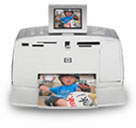
 “A must-have for any digicam owner, HP’s
Photosmart 375 is compact, quiet, and a solid performer.”
“A must-have for any digicam owner, HP’s
Photosmart 375 is compact, quiet, and a solid performer.”
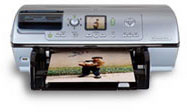
 † “What
really distinguishes [the HP Photosmart 8150] is kiosk-style features
for direct printing, with options to crop, sharpen, adjust brightness,
apply digital flash, and more.”
† “What
really distinguishes [the HP Photosmart 8150] is kiosk-style features
for direct printing, with options to crop, sharpen, adjust brightness,
apply digital flash, and more.”