| Getting started is easy! |
| Set up your thermostat in a few simple steps. |
|
| Set your temperature schedule
|
|
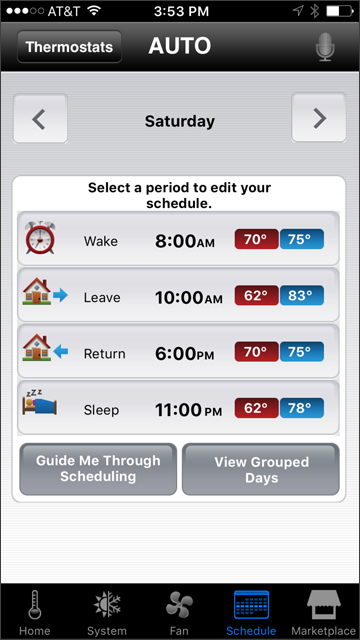
| Creating a schedule around your day helps you enjoy maximum comfort and save on money and energy, automatically.
|
|
| |
|
|
| 1. |
Select schedule on your navigation
|
| |
| 2. |
Select a period to enter into your schedule
|
| |
| 3. |
Select the days that have the same schedule |
| |
|
|
|
|
|
|
| Your personal weather forecast |
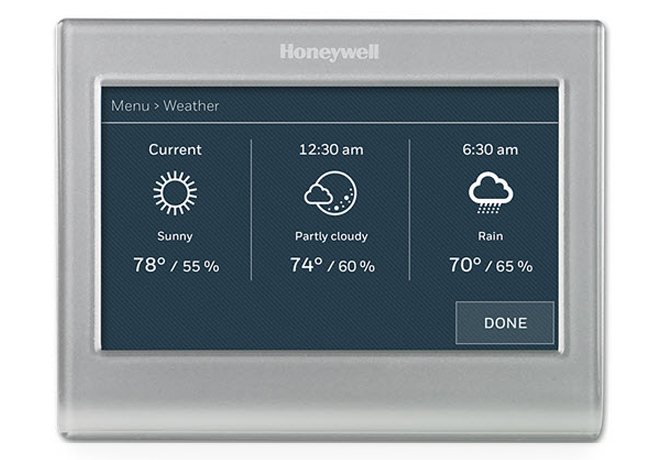
| Rain or shine, you'll always know what to wear with real-time weather updates from your Wi-Fi Smart Color Thermostat. Just go to the main menu and select Weather.
|
|
|
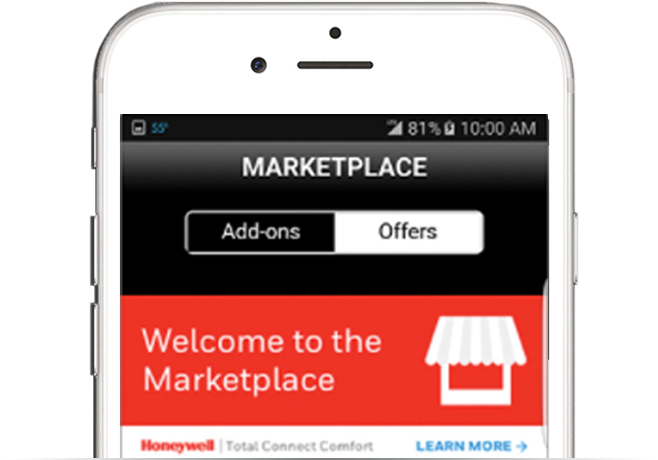
| Explore Honeywell Marketplace
|
| Only on your Total Connect Comfort app: exclusive offers, local discounts, direct connection to Honeywell pros, and more.
|
|
|
| It's simple to add users to your thermostat controls.
|
|
| 1. |
| Log into your totalcomfortconnect.com account. |
|
| 2. |
| Enter in user emails and set their access level to send them an email registration invite. |
|
| 3. |
| Registered users can now use the Total Connect Comfort app on their mobile device—even with voice command—to help manage the temperature. |
|
|
|
| ›
|
The best temperature for a good night's sleep is between [60 and 67°F.][15 and 19°C.] |
|
|
 |
| Got questions? |
| Learn more about [Product Name], or check out our general FAQ page. |
|
| Replacing a mercury thermostat? |
|
| Safely and easily dispose of your old mercury thermostats at Honeywell partner site [thermostatrecycle.org.][http://www.hrai.ca/public-drop-off-locations.] Just enter your [zip][postal] code to find a collection site near you. |
|
|
|